
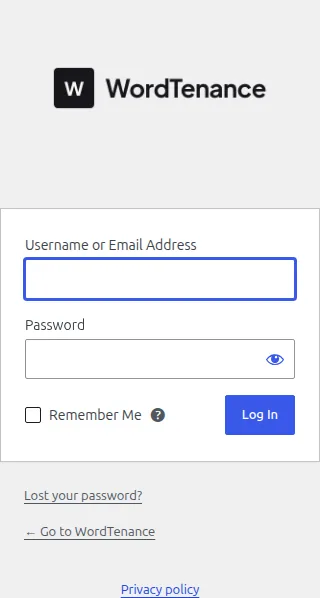
You can add a custom logo to the WordPress login page with a small snippet hooked into login_enqueue_scripts that swaps in your own background image via CSS, plus a filter to point the logo’s link at your own site instead of WordPress.org.
Why Replace the Default Login Logo
- The default WordPress logo and outbound link to wordpress.org look unfinished on a client or store login screen
- A branded login page reinforces trust for staff, vendors, or members logging into a store’s back end
- It’s a quick, low-effort polish that clients often notice right away
Step 1: Swap the Logo Image
/** Replace the WordPress login logo with a custom store logo */
add_action( 'login_enqueue_scripts', 'apply_custom_login_logo' );

function apply_custom_login_logo() {
    ?>
    <style type="text/css">
        #login h1 a, .login h1 a {
            background-image: url(/wp-content/uploads/2024/01/store-logo.png);
            height: 120px;
            width: 220px;
            background-size: contain;
            background-repeat: no-repeat;
            background-color: transparent;
        }
    </style>
    <?php
}
Step 2: Point the Logo Link to Your Own Site
/** Make the login logo link to the homepage instead of wordpress.org */
add_filter( 'login_headerurl', 'point_login_logo_to_homepage' );

function point_login_logo_to_homepage( $url ) {
    return home_url( '/' );
}
Changing the Logo’s Title Attribute Too
/** Update the hover title text on the login logo link */
add_filter( 'login_headertext', 'update_login_logo_title' );

function update_login_logo_title( $text ) {
    return get_bloginfo( 'name' );
}
Troubleshooting
The logo image doesn’t appear at all
Double-check the image path is correct and publicly accessible — an incorrect upload year/month folder in the URL is the most common mistake when copying this snippet.
The logo looks stretched or cropped oddly
Adjust the height/width values to match your actual logo’s aspect ratio, or switch background-size to contain if it isn’t already, so the whole image fits without distortion.
Frequently Asked Questions
Does this work for wp-admin as well as wp-login.php?
This specific hook only targets the login screen; changing the wp-admin dashboard logo/branding needs separate hooks like admin_head or a white-labeling plugin.
Can I add this without editing functions.php directly?
Yes, a lightweight site-specific plugin or a custom login branding plugin can hold the same snippet if you’d rather not touch the theme’s functions.php.
Will a WordPress core update remove this customization?
No, as long as the snippet lives in a child theme or a separate plugin file rather than the parent theme, it will survive both WordPress and theme updates.
Consider matching the login page’s background color to your brand palette at the same time — once you add a custom logo to the WordPress login page, a mismatched background color is often the next thing that stands out as unfinished.
Conclusion
Two small hooks are enough to add a custom logo to the WordPress login page and point it back to your own site, giving the login screen a fully branded look in a few minutes.
See also How to Set the Default WordPress Admin Login Page to Products.
Prefer no code? All-in-One Utilities handles this kind of change from a settings screen. Its Login Logo guide also shows how.