
To add text under each product on the WooCommerce shop page, hook a small PHP function into woocommerce_after_shop_loop_item to echo your message — this prints custom text (like a shipping note or badge) beneath every product thumbnail across the shop and category archives.
Why Add Text to the Shop Loop
- Highlighting a perk like free shipping or same-day dispatch can lift click-through rate
- Badges and labels give the shop grid a more polished, merchandised feel
- It’s a lightweight alternative to a full badge-management plugin for a single, simple message
Step 1: Add the Loop Text Snippet
/** Print a short badge under every product in the shop loop — add to functions.php */
add_action( 'woocommerce_after_shop_loop_item', 'print_shop_loop_badge', 5 );

function print_shop_loop_badge() {
    echo '<p class="shop-loop-badge">Ships in 24 Hours</p>';
}
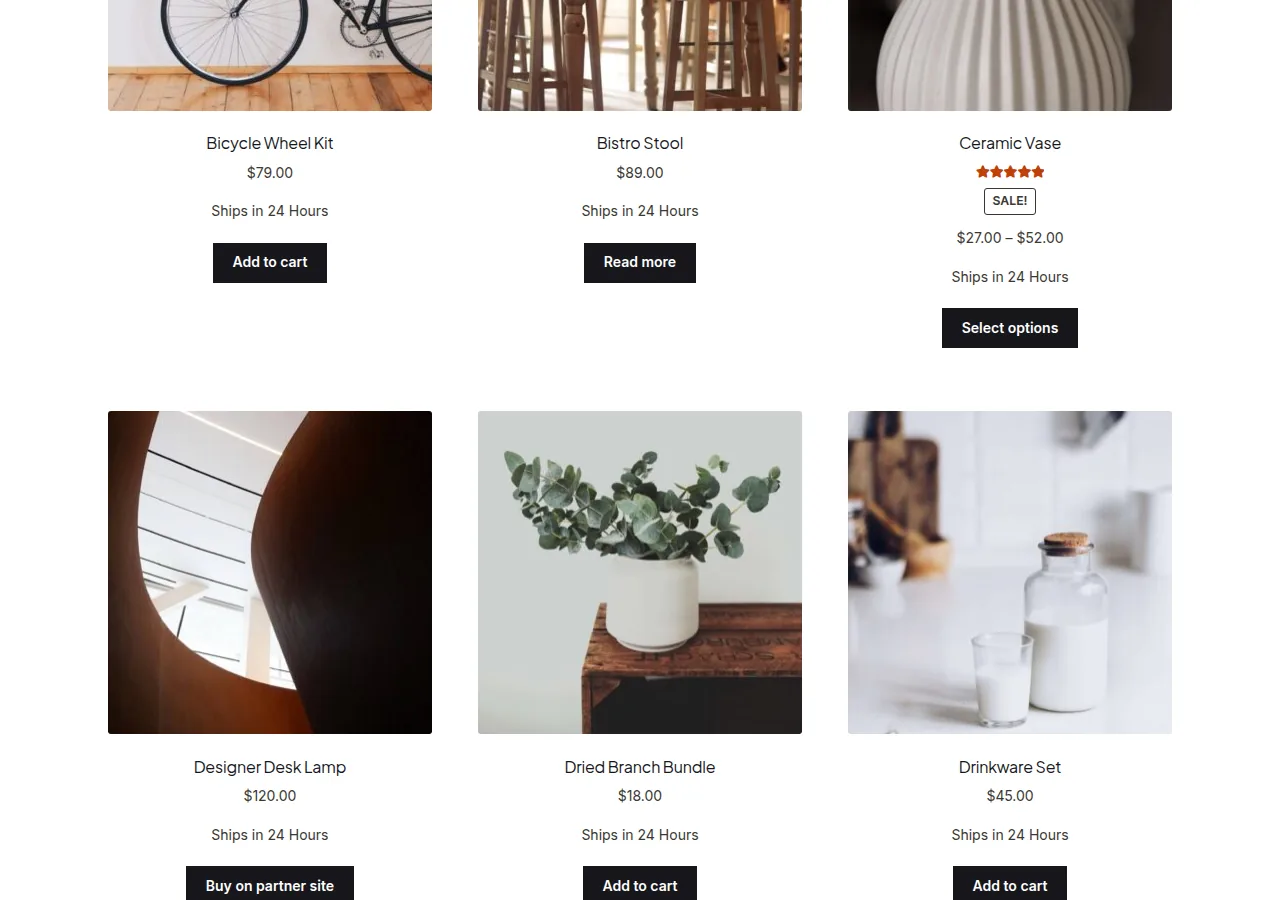
Changing Where the Text Appears
Priority 5 on woocommerce_after_shop_loop_item places the badge right after the product thumbnail/title, before price and add-to-cart. To position it below the price instead, hook into woocommerce_after_shop_loop_item_title with a later priority:
add_action( 'woocommerce_after_shop_loop_item_title', 'print_shop_loop_badge', 15 );Showing the Badge Only for Certain Products
Rather than printing the same message under every product, check a product property first — for example, only show it for items in a specific shipping class:
function print_shop_loop_badge_conditional() {

    global $product;

    if ( 'express' === $product->get_shipping_class() ) {
        echo '<p class="shop-loop-badge">Ships in 24 Hours</p>';
    }
}
add_action( 'woocommerce_after_shop_loop_item', 'print_shop_loop_badge_conditional', 5 );
Troubleshooting
The Text Doesn’t Appear on the Single Product Page
That’s expected — woocommerce_after_shop_loop_item only fires inside the shop/category/tag loop. To show similar text on the single product page too, add a second snippet hooked to woocommerce_single_product_summary instead.
Badge Text Breaks the Grid Layout
If the extra line of text pushes product cards out of alignment, add a fixed min-height or line-clamp rule to the badge’s CSS class so every card reserves the same amount of space regardless of whether the badge text wraps.
Frequently Asked Questions
Can I show different text for different products?
Yes — check a product meta field, category, or shipping class inside the function and echo different text depending on the result, as shown in the conditional example above.
Does this affect the product’s actual description?
No, this is purely a visual addition to the loop template and has no effect on the product’s stored title, short description, or long description.
Will this show on Recently Viewed or Related Products widgets?
Only if those widgets render products through the same woocommerce_after_shop_loop_item hook, which varies by theme — test each widget individually to confirm.
Conclusion
A single action hook lets you add text under each product on the WooCommerce shop page without installing a badge plugin. Keep the message short so it doesn’t disrupt your grid’s alignment, and consider making it conditional if it only applies to some products.
See also How to Show the Product Category on the WooCommerce Shop Page. Then read How to Show Only One Category on the WooCommerce Shop Page.
Prefer no code? All-in-One Utilities Woo Add-on adds over 50 WooCommerce features, so you can switch them on without code.