
You can automate upsells and discounts in WooCommerce by defining rule-based offers — upsells, cross-sells, order bumps, and BOGO deals — that trigger automatically based on cart contents or purchase history, instead of manually building a new promotion for every product.
Why Automate Instead of Running Manual Promotions
- Manually creating a discount for every product or category doesn’t scale past a small catalog
- Automated rules react instantly to what’s actually in the cart, which converts better than generic storewide sales
- It frees up time to focus on strategy instead of repetitive coupon and banner setup
Step 1: Choose the Right Offer Type for the Goal
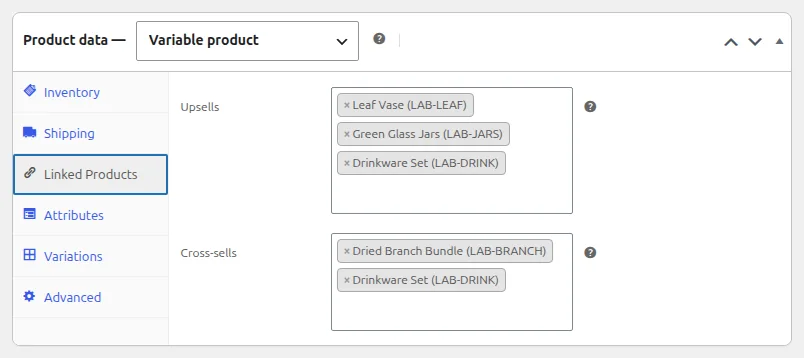
Upsells
Suggest a higher-value alternative to what’s already in the cart — a bigger storage size, a premium material, or a bundle that includes the item being viewed.
Cross-Sells and Order Bumps
Recommend complementary products at the product page (cross-sell) or right at checkout (order bump), where a small, relevant add-on has the highest chance of being accepted.
Buy One Get One (BOGO) and Tiered Discounts
Reward larger basket sizes automatically — buy two, get a third free, or unlock free shipping past a spending threshold — without a manual coupon code.
Step 2: Automate the Targeting, Not Just the Offer
The real time-saver isn’t the discount itself but the targeting logic: rules that automatically match the right offer to the right product or customer segment (first-time buyer vs. repeat customer, cart value, category viewed) rather than manually assigning offers product-by-product.
Troubleshooting Common Issues
Offers Feel Repetitive or Annoying
If the same upsell or popup shows on every visit regardless of relevance, add frequency capping or exclude customers who’ve already declined the same offer recently.
Discount Stacking Creates Pricing Errors
When multiple automated rules can apply to the same cart, decide upfront whether they stack or whether only the highest-value discount should win — unchecked stacking is a common source of margin-eroding pricing mistakes.
Frequently Asked Questions
Do automated upsells slow down the checkout page?
Well-built offer plugins load asynchronously, so the impact should be minimal — test page speed before and after enabling any new offer tooling to confirm.
Should I automate every product’s upsell?
No — start with your top sellers or highest-margin products, measure conversion impact, then expand to the rest of the catalog.
What’s the difference between a cross-sell and an order bump?
A cross-sell appears on the product or cart page before checkout; an order bump appears during checkout itself, right before payment.
Conclusion
Automating upsells and discounts in WooCommerce comes down to matching the right offer type — upsell, cross-sell, order bump, or BOGO — to the right targeting rule, so relevant offers appear without manual setup for every product.
See also How to Set Up WooCommerce Dynamic Pricing (BOGO, Buy X Get Y). Then read How to Increase Average Order Value in WooCommerce.
Prefer no code? All-in-One Utilities Woo Add-on adds over 50 WooCommerce features, so you can switch them on without code.