You can get WooCommerce cart, checkout, and account URLs with built-in functions like wc_get_cart_url() and wc_get_checkout_url() instead of hardcoding page paths — so your custom code keeps working even if a store owner renames “cart” to “basket” or changes any page slug.
Why Never Hardcode These URLs
- Store owners frequently rename default page slugs (cart, checkout, my-account) to match their branding
- Hardcoded paths silently break the moment a page is renamed or the site structure changes
- WooCommerce’s built-in functions always resolve to the current, correct URL automatically
Step 1: Use the Right Function for Each Page
/* Product URL — on a single product page */
get_the_permalink();

/* Product URL — with a known product ID */
get_permalink( $product_id );

/* Product URL — with a $product object */
$product->get_permalink();

/* Cart URL */
wc_get_cart_url();

/* Checkout URL */
wc_get_checkout_url();

/* Shop page URL */
wc_get_page_permalink( 'shop' );

/* My Account page URL */
wc_get_page_permalink( 'myaccount' );
My Account Endpoint URLs
wc_get_account_endpoint_url( 'edit-address' );
wc_get_account_endpoint_url( 'edit-account' );
wc_get_account_endpoint_url( 'payment-methods' );
wc_get_account_endpoint_url( 'orders' );
wc_get_account_endpoint_url( 'customer-logout' );
wc_get_account_endpoint_url( 'dashboard' );
Category, Tag, and Thank You Page URLs
/* Product category URL */
get_term_link( 'furniture', 'product_cat' );

/* Product tag URL */
get_term_link( 'clearance', 'product_tag' );

/* Thank You (order-received) page URL for a given order */
wc_get_endpoint_url( 'order-received', $order_id, wc_get_checkout_url() );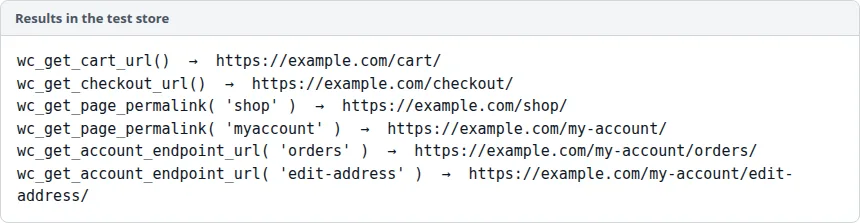
Troubleshooting
wc_get_account_endpoint_url() Returns the Wrong Page
Confirm the endpoint slug matches exactly what’s registered under WooCommerce > Settings > Advanced > Account Endpoints — a store that renamed an endpoint slug needs that exact renamed value passed in.
get_term_link() Returns a WP_Error
This happens if the term slug/taxonomy combination doesn’t exist — double check the category or tag actually exists and that you’re using the right taxonomy name (product_cat vs. product_tag).
Frequently Asked Questions
Why not just use the page slug directly?
Because slugs can be changed at any time in WordPress admin, and a hardcoded URL won’t update — these functions always reflect the current configuration.
Do these functions work in a multisite setup?
Yes, they resolve relative to the current site context automatically, so no special multisite handling is needed.
Is there a function for the “order pay” URL too?
Yes, use $order->get_checkout_payment_url() when you have access to the order object.
Conclusion
Getting WooCommerce cart, checkout, and account URLs the right way means always reaching for the built-in helper functions instead of hardcoding paths. It keeps custom code resilient to page renames and site restructuring.
See also WooCommerce My Account Page Hooks: A Visual Guide. Then read How to Customize the My Account Page in WooCommerce.
Prefer no code? All-in-One Utilities Woo Add-on adds over 50 WooCommerce features, so you can switch them on without code.